Mổ xẻ defuddle.md - Reverse-engineer cách Obsidian CEO biến web pages thành Markdown
Từ đọc source code đến tự build Cloudflare Worker parse web pages và X/Twitter thành Markdown.

Steph Ango (CEO của Obsidian) đã open source thư viện Defuddle từ lâu, nó là một công cụ dùng để extract nội dung chính từ phần lớn các web pages hiện nay. Nhưng cách đây 3 ngày (3/3), ảnh chính thức launch website defuddle.md
Mình thấy tool này rất hay phù hợp cho nhiều workflow hiện nay, nên cũng thử mổ xẻ xem technique ảnh làm là gì, rồi thử build (cùng AI) 1 demo nho nhỏ dựa theo technique ấy, và …💥 nó work ngon lành cành đào luôn 🚀
Bài viết này có thiên hướng technical một xíu, mục đích mổ xẻ để có cái nhìn rõ hơn về architecture đằng sau, sẽ đi từ: tại sao defuddle.md hữu ích → reverse-engineer kiến trúc → tự build Cloudflare Worker clone.
Các bạn cũng có thể visit repo và live demo của mình để tham khảo:
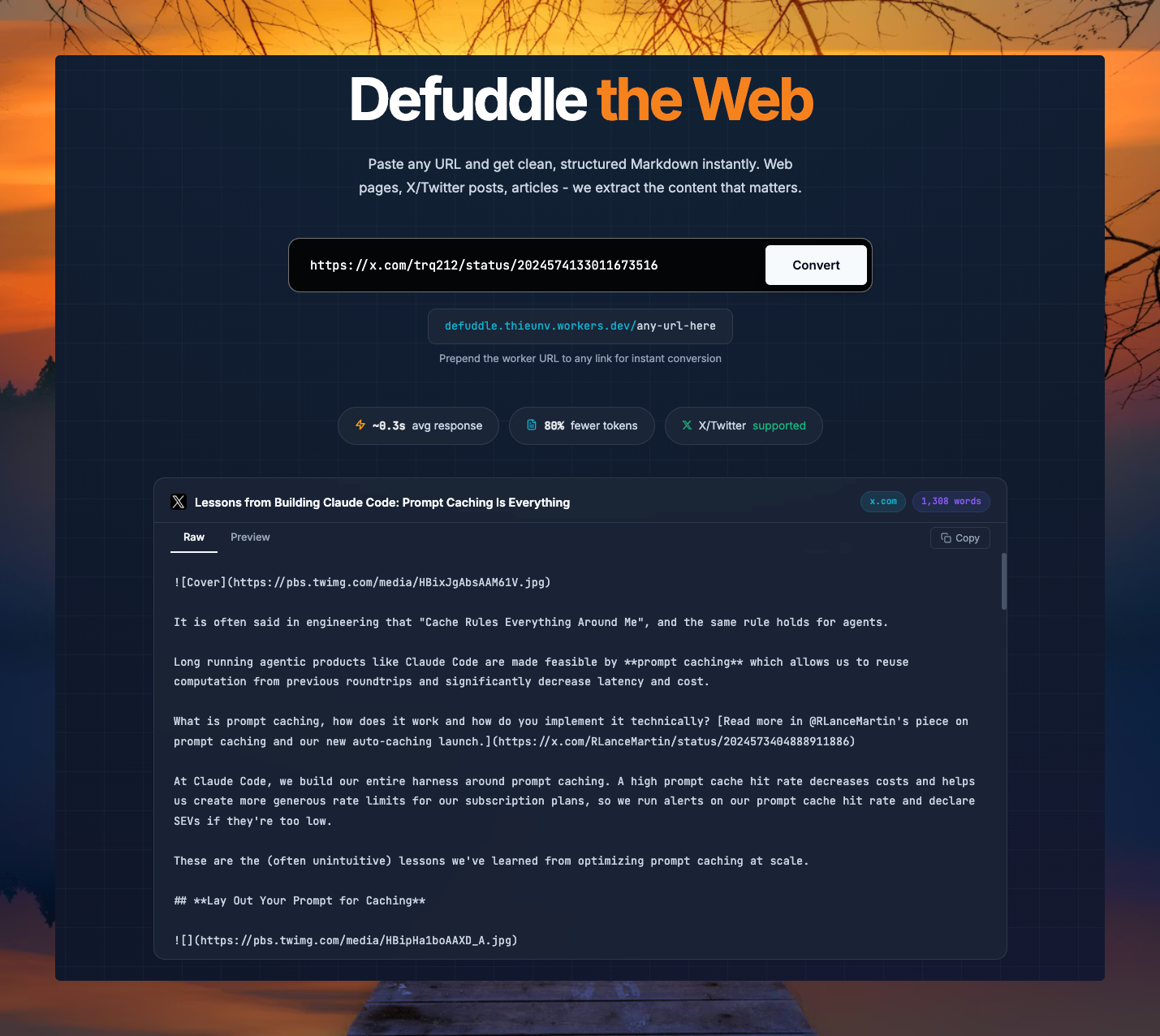
Defuddle là gì và tại sao nên quan tâm?
Defuddle là một thư viện TypeScript extract nội dung chính từ bất kỳ trang web nào. Nó loại bỏ hết clutter - ads, sidebars, headers, footers, comments, popups - chỉ giữ lại content thuần.
Lưu ý là dự án vẫn đang WIP nên liên tục cập nhật repo của các giả nhé:
Beware! Defuddle is very much a work in progress!
Defuddle được viết cho Obsidian Web Clipper, nhưng hoàn toàn có thể dùng standalone. So với Mozilla Readability (cùng mục đích), Defuddle:
Ít aggressive hơn - không xóa quá nhiều element không chắc chắn
Output nhất quán cho footnotes, math, code blocks
Dùng mobile styles để đoán element nào không cần thiết
Extract nhiều metadata hơn - bao gồm schema.org data
defuddle.md - Siêu nhanh, chỉ cần paste URL và click
Với việc Steph Ango vừa release web interface thì giờ đây bạn có thể dùng Defuddle mà không cần cài gì cả. Chỉ cần thêm defuddle.md/ trước bất kỳ URL nào (với trang có server-rendered HTML):
https://defuddle.md/https://www.vividkit.dev→ Ra ngay Markdown sạch. Hoặc dùng curl:
curl defuddle.md/vividkit.dev→ Nhận markdown với YAML frontmatter (title, author, ngày đăng...). Thậm chí parse được cả bài viết trên X:
curl defuddle.md/x.com/ryancarson/status/2028916090596643078
Dùng curl hay CLI gì đều được. Không cần mở trang rồi copy-paste một cách thủ công như trước nữa.
Có gì khác so với convert HTML truyền thống?
Đây không phải kiểu “convert thẳng” HTML sang Markdown như markdown.new. Defuddle thông minh hơn nhiều:
Loại bỏ hoàn toàn rác: quảng cáo, sidebar, footer, header, comment, navigation - dùng mobile styles để phát hiện phần thừa cực chính xác
Giữ nguyên định dạng: bảng, code block, hình ảnh, footnote…
Extract metadata: tác giả, ngày đăng, tiêu đề, mô tả, schema.org data
Dành cho ai?
Researcher, developer, writer: lưu bài báo, tài liệu nhanh chóng với nội dung gọn gàng
AI/LLM pipeline: feed content sạch cho AI agents mà không cần chỉnh sửa
Note-taking: hoàn hảo với Obsidian, Notion, … (đặc biệt tích hợp sâu với Obsidian Web Clipper)
Miễn phí, open-source
MIT license, GitHub
NPM package, playground thử nghiệm ngay trên web
Ai cũng có thể tự host, tự integrate
OK, vậy ảnh dùng technique gì?
Đây là những gì mình phát hiện được sau khi mổ xẻ source-code của ảnh:
FxEmbed / FxTwitter - Chìa khóa parse X/Twitter
Câu hỏi đầu tiên: làm sao parse được X/Twitter khi nó là SPA (Single Page Application) - fetch HTML sẽ chỉ nhận được shell rỗng?
Câu trả lời nằm ở FxEmbed (trước đây là FxTwitter) - một Cloudflare Worker giúp fix embed cho X/Twitter và Bluesky trên Discord, Telegram. Điều quan trọng: FxEmbed cung cấp một JSON API tại api.fxtwitter.com để lấy dữ liệu tweet đầy đủ - text, media, poll, quote, và cả X articles (bài viết dài).
Defuddle sử dụng chính API này (trong source code chưa release lên npm) để parse nội dung X/Twitter. Đây là chìa khóa để clone lại tính năng này.
Kiến trúc tổng quan
Client (curl / AI agent)
  │
  ▼
Cloudflare Worker
  │
  ├── Route: /              → Usage info
  ├── Route: /<url>         → Parse pipeline
  │     │
  │     ├── X/Twitter URL?
  │     │   ├── YES → FxTwitter API → DraftJS parser → Markdown
  │     │   └── NO  → fetch HTML → linkedom → Defuddle → Turndown → Markdown
  │     │
  │     └── Format: YAML frontmatter + markdown body
  │
  └── Response: text/markdown (hoặc JSON nếu Accept header)
Bước 1: Khởi tạo project
npx wrangler init defuddle-worker
cd defuddle-worker
npm install defuddle linkedom turndown @types/turndown
package.json
{
  "dependencies": {
    "@types/turndown": "^5.0.6",
    "defuddle": "^0.8.0",
    "linkedom": "^0.18.12",
    "turndown": "^7.2.2"
  }
}
wrangler.jsonc
{
  "name": "defuddle-worker",
  "main": "src/index.ts",
  "compatibility_date": "2026-03-01",
  "compatibility_flags": ["nodejs_compat"],
  "assets": {
    "directory": "./public/"
  }
}
Lưu ý:
Flag
nodejs_compatlà bắt buộc - linkedom và turndown dùng một số Node.js APIs.
assetscho phép serve static frontend từ folderpublic/
Bước 2: Polyfill cho Workers environment
Cloudflare Workers không có window, document, DOMParser, Node, hay getComputedStyle. Cả linkedom, turndown và defuddle đều cần những globals này. File polyfill.ts stub tất cả:
// src/polyfill.ts
import { DOMParser, parseHTML } from 'linkedom';

const g = globalThis as any;

// Turndown checks window.DOMParser at module load time
if (!g.DOMParser) {
  g.DOMParser = DOMParser;
}
if (!g.window) {
  g.window = g;
}
if (!g.document) {
  const { document } = parseHTML('');
  g.document = document;
}
if (!g.Node) {
  g.Node = { ELEMENT_NODE: 1, TEXT_NODE: 3 };
}

// Defuddle uses getComputedStyle for empty-element cleanup
if (!g.getComputedStyle) {
  g.getComputedStyle = () => ({ display: '' });
}
Đây chính là cách defuddle.md website cũng làm (source code trong website/src/polyfill.ts của repo defuddle).
Bước 3: Worker entry point
// src/index.ts
import './polyfill';
import { convertToMarkdown, formatResponse } from './convert';

const BLOCKED_HOSTS = ['localhost'];

const CORS_HEADERS = {
  'Access-Control-Allow-Origin': '*',
  'Access-Control-Allow-Methods': 'GET, POST, OPTIONS',
  'Access-Control-Allow-Headers': 'Content-Type, Accept',
};

export default {
  async fetch(request: Request): Promise<Response> {
    const url = new URL(request.url);
    const path = url.pathname;

    // Handle CORS preflight
    if (request.method === 'OPTIONS') {
      return new Response(null, { headers: CORS_HEADERS });
    }

    // ── /api/convert endpoint (cho frontend) ──
    if (path === '/api/convert' && request.method === 'POST') {
      try {
        const body = await request.json() as { url?: string };
        const targetUrl = body?.url?.trim();
        if (!targetUrl) {
          return jsonError('Missing "url" field in request body.', 400);
        }

        let parsedTarget: URL;
        try { parsedTarget = new URL(targetUrl); } catch {
          return jsonError('Invalid URL.', 400);
        }

        if (BLOCKED_HOSTS.some(host => parsedTarget.hostname.includes(host))) {
          return jsonError('Cannot convert this URL.', 400);
        }

        const result = await convertToMarkdown(targetUrl);
        return new Response(JSON.stringify(result, null, 2), {
          headers: { 'Content-Type': 'application/json; charset=utf-8', ...CORS_HEADERS },
        });
      } catch (err) {
        const message = err instanceof Error ? err.message : 'An unexpected error occurred';
        return jsonError(message, 502);
      }
    }

    // ── Static assets fallthrough ──
    if (path === '/' || path === '') {
      return new Response(null, { status: 404 }); // Let static assets handle
    }

    // ── URL conversion endpoint (GET /{url}) ──
    let targetUrl = decodeURIComponent(path.slice(1));
    if (url.search) targetUrl += url.search;
    if (!targetUrl.match(/^https?:\/\//)) targetUrl = 'https://' + targetUrl;

    let parsedTarget: URL;
    try { parsedTarget = new URL(targetUrl); } catch {
      return errorResponse('Invalid URL.', 400);
    }

    if (BLOCKED_HOSTS.some(host => parsedTarget.hostname.includes(host))) {
      return errorResponse('Cannot convert this URL.', 400);
    }

    try {
      const result = await convertToMarkdown(targetUrl);

      // JSON output nếu client yêu cầu
      const accept = request.headers.get('Accept') || '';
      if (accept.includes('application/json')) {
        return new Response(JSON.stringify(result, null, 2), {
          headers: { 'Content-Type': 'application/json; charset=utf-8', ...CORS_HEADERS },
        });
      }

      // Default: markdown
      const markdown = formatResponse(result, targetUrl);
      return new Response(markdown, {
        headers: {
          'Content-Type': 'text/markdown; charset=utf-8',
          ...CORS_HEADERS,
          'Cache-Control': 'public, max-age=3600',
        },
      });
    } catch (err) {
      const msg = err instanceof Error ? err.message : 'Unknown error';
      return errorResponse(msg, 502);
    }
  },
} satisfies ExportedHandler;
Logic routing đơn giản: lấy pathname làm target URL, validate, fetch & parse, trả về markdown.
Các điểm cần lưu ý:
CORS headers - cho phép frontend (static site trong
public/) gọi API/api/convertPOST endpoint - frontend gửi JSON{ url: "..." }, nhận JSON responseBLOCKED_HOSTS- chặn self-referential requestsStatic asset filtering - tránh conflict với file
.js,.css,.pngHelper functions
errorResponse()vàjsonError()cho consistent error format
Bước 4: Core conversion — Regular pages
Đây là pipeline cho trang web thường:
fetch HTML → linkedom parseHTML → Defuddle.parse() → Turndown → Markdown// src/convert.ts (phần regular pages)
import { parseHTML } from 'linkedom';
import Defuddle from 'defuddle';
import TurndownService from 'turndown';
const MAX_SIZE = 5 * 1024 * 1024; // 5MB
async function fetchAndParse(targetUrl: string): Promise<ConvertResult> {
const response = await fetch(targetUrl, {
headers: {
'User-Agent': 'Mozilla/5.0 (compatible; DefuddleWorker/1.0)',
'Accept': 'text/html,application/xhtml+xml',
},
redirect: 'follow',
});
if (!response.ok) {
throw new Error(`Failed to fetch: ${response.status} ${response.statusText}`);
}
// Validate content type và size
const contentType = response.headers.get('content-type') || '';
if (!contentType.includes('text/html') && !contentType.includes('application/xhtml+xml')) {
throw new Error(`Not an HTML page (content-type: ${contentType})`);
}
const contentLength = response.headers.get('content-length');
if (contentLength && parseInt(contentLength) > MAX_SIZE) {
throw new Error(`Page too large (max 5MB)`);
}
const html = await response.text();
if (html.length > MAX_SIZE) {
throw new Error(`Page too large (max 5MB)`);
}
const { document } = parseHTML(html);
// Stub missing APIs cho defuddle
const doc = document as any;
if (!doc.styleSheets) doc.styleSheets = [];
if (doc.defaultView && !doc.defaultView.getComputedStyle) {
doc.defaultView.getComputedStyle = () => ({ display: '' });
}
// Defuddle extract nội dung chính
const defuddle = new Defuddle(document as any, { url: targetUrl });
const result = defuddle.parse();
// Turndown convert HTML → Markdown
const turndown = new TurndownService({
headingStyle: 'atx',
codeBlockStyle: 'fenced',
});
const markdown = turndown.turndown(result.content || '');
return {
title: result.title || '',
author: result.author || '',
published: result.published || '',
description: result.description || '',
domain: result.domain || '',
content: markdown,
wordCount: result.wordCount || 0,
source: targetUrl,
favicon: result.favicon,
image: result.image,
site: result.site,
};
}Tại sao dùng linkedom thay vì JSDOM?
Vì linkedom nhẹ hơn nhiều và tương thích với Cloudflare Workers (JSDOM quá nặng cho edge runtime).
Bước 5: X/Twitter - Bài toán khó
X/Twitter là client-rendered SPA - khi fetch HTML từ x.com, bạn chỉ nhận được một shell rỗng với JavaScript. Không có content nào trong HTML cả.
Giải pháp: FxTwitter API
FxEmbed cung cấp JSON API tại api.fxtwitter.com:
GET https://api.fxtwitter.com/{username}/status/{tweetId}Response chứa toàn bộ thông tin: text, author, media, polls, quotes, và đặc biệt: X Articles.
Regular tweets vs X Articles
Với tweet thường, nội dung nằm trong tweet.text. Nhưng với X Articles (bài viết dài), tweet.text trống. Nội dung thực sự nằm trong tweet.article.content - một cấu trúc DraftJS blocks:
{
  "tweet": {
    "text": "",
    "article": {
      "title": "How to force your agent to obey your design system",
      "content": {
        "blocks": [
          { "type": "unstyled", "text": "Most design systems fail..." },
          { "type": "header-two", "text": "What is a design system?",
            "inlineStyleRanges": [{ "style": "Bold", "offset": 0, "length": 24 }]
          },
          { "type": "unordered-list-item", "text": "Design tokens..." },
          { "type": "ordered-list-item", "text": "Canonical docs..." },
          { "type": "atomic", "entityRanges": [{ "key": 0 }] }
        ],
        "entityMap": [
          { "key": "0", "value": { "data": { "markdown": "```typescript\n// code\n```" } } }
        ]
      }
    }
  }
}
DraftJS-to-Markdown converter
Mỗi block type map sang markdown syntax tương ứng:
/**
* Convert DraftJS blocks to Markdown.
* @param mediaEntities - Article-level media entities cho việc resolve MEDIA entity
*/
function blocksToMarkdown(
blocks: DraftBlock[], entityMap: Record<string, DraftEntity>,
mediaEntities: FxArticleMediaEntity[] = []
): string {
const lines: string[] = [];
for (const block of blocks) {
// Apply entity links (hyperlinks, @mentions) trước, rồi inline styles
let text = applyEntityLinks(block.text || '', block.entityRanges || [], entityMap);
text = applyInlineStyles(text, block.inlineStyleRanges || []);
switch (block.type) {
case 'header-one': lines.push(`# ${text}`); break;
case 'header-two': lines.push(`## ${text}`); break;
case 'header-three': lines.push(`### ${text}`); break;
case 'unordered-list-item': lines.push(`- ${text}`); break;
case 'ordered-list-item': lines.push(`1. ${text}`); break;
case 'blockquote': lines.push(`> ${text}`); break;
case 'code-block': lines.push('```\n' + block.text + '\n```'); break;
case 'atomic': {
for (const range of block.entityRanges || []) {
const entity = entityMap[range.key];
if (!entity) continue;
const { type: entityType, data } = getEntityInfo(entity);
// Markdown code block entity
if (data.markdown) { lines.push(data.markdown); continue; }
// MEDIA entity - article images/videos resolve qua mediaEntities
if (entityType === 'MEDIA') {
for (const item of data.mediaItems || []) {
const resolved = resolveArticleMediaUrl(item.mediaId, mediaEntities);
if (resolved) {
lines.push(resolved.type === 'image'
? `` : `[Video](${resolved.url})`);
}
}
continue;
}
// TWEET entity - embedded tweet
if (entityType === 'TWEET' || entityType === 'EMBEDDED_TWEET') {
const tweetId = data.id || data.tweetId || '';
if (tweetId) lines.push(`> [Embedded Tweet](https://x.com/i/status/${tweetId})`);
continue;
}
// IMAGE / VIDEO entity (direct)
if (entityType === 'IMAGE' || entityType === 'PHOTO') {
const url = data.src || data.url || '';
if (url) lines.push(``);
continue;
}
if (entityType === 'VIDEO') {
const url = data.src || data.url || '';
if (url) lines.push(`[Video](${url})`);
continue;
}
}
break;
}
default: lines.push(text); break;
}
}
return lines.join('\n\n');
}Điểm quan trọng: FxTwitter API wrap entity data dưới .value - cần helper getEntityInfo() để normalize. Và entityMap có thể là array hoặc object, cần normalize trước khi dùng. Ở đây mình có enhance thêm để lấy tất cả media có trong bài viết, repo của tác giả hiện tại chỉ lấy được mỗi… cover image.
Inline styles (Bold, Italic, Code) được apply bằng cách sort offset giảm dần rồi chèn markdown markers. Lưu ý handle cả uppercase và lowercase vì FxTwitter API không nhất quán:
function applyInlineStyles(text: string, ranges: any[]): string {
  if (!ranges.length) return text;
  const sorted = [...ranges].sort((a, b) => b.offset - a.offset);

  let result = text;
  for (const range of sorted) {
    const before = result.slice(0, range.offset);
    const segment = result.slice(range.offset, range.offset + range.length);
    const after = result.slice(range.offset + range.length);

    switch (range.style) {
      case 'Bold':          case 'BOLD':
        result = before + `**${segment}**` + after; break;
      case 'Italic':        case 'ITALIC':
        result = before + `*${segment}*` + after; break;
      case 'Code':          case 'CODE':
        result = before + `\`${segment}\`` + after; break;
      case 'Strikethrough': case 'STRIKETHROUGH':
        result = before + `~~${segment}~~` + after; break;
    }
  }
  return result;
}
Entity links hyperlinks, @mentions, #hashtags) trong text được xử lý tương tự - sort descending rồi chèn markdown links:
function applyEntityLinks(
  text: string, entityRanges: DraftBlock['entityRanges'],
  entityMap: Record<string, DraftEntity>
): string {
  if (!entityRanges.length) return text;
  const sorted = [...entityRanges].sort((a, b) => b.offset - a.offset);

  let result = text;
  for (const range of sorted) {
    const entity = entityMap[range.key];
    if (!entity) continue;
    const { type: entityType, data } = getEntityInfo(entity);

    const before = result.slice(0, range.offset);
    const segment = result.slice(range.offset, range.offset + range.length);
    const after = result.slice(range.offset + range.length);

    if (entityType === 'LINK' || entityType === 'URL') {
      result = before + `[${segment}](${data.url || data.href})` + after;
    } else if (entityType === 'MENTION') {
      const name = data.screenName || segment.replace('@', '');
      result = before + `[@${name}](https://x.com/${name})` + after;
    } else if (entityType === 'HASHTAG') {
      const tag = data.hashtag || segment.replace('#', '');
      result = before + `[#${tag}](https://x.com/hashtag/${tag})` + after;
    }
  }
  return result;
}
Xử lý tweet text: expand t.co URLs
Tweet text từ API thường chứa URLs rút gọn (t.co). Actual code dùng raw_text.facets để expand chúng thành links đầy đủ, đồng thời convert @mentions và #hashtags:
function expandTweetText(tweet: FxTweet): string {
  if (!tweet.raw_text?.facets?.length) return tweet.text || '';

  const { text, facets } = tweet.raw_text;
  const chars = [...text]; // Unicode-safe
  let result = '';
  let lastIndex = 0;

  const sorted = [...facets].sort((a, b) => a.indices[0] - b.indices[0]);
  for (const facet of sorted) {
    const [start, end] = facet.indices;
    result += chars.slice(lastIndex, start).join('');

    if (facet.type === 'url' && facet.display) {
      const linkUrl = facet.replacement || facet.original || chars.slice(start, end).join('');
      result += `[${facet.display}](${linkUrl})`;
    } else if (facet.type === 'mention') {
      result += `[@${facet.id}](https://x.com/${facet.id})`;
    } else {
      result += chars.slice(start, end).join('');
    }
    lastIndex = end;
  }
  result += chars.slice(lastIndex).join('');
  return result;
}
Media, Quotes, Polls, Engagement
Các hàm render chuyên biệt:
renderMedia()- photos, videos/GIFs (kèm duration), external media (YouTube embeds), broadcasts/live streamsrenderQuote()- quote tweet với author, text, media, link to originalrenderPoll()- poll choices với visual bar (█░), percentage, vote countrenderEngagement()- likes ❤️, retweets 🔁, replies 💬, views 👁, bookmarks 🔖
Tất cả được ghép vào cuối content trong fetchTweetData()
Router: chọn pipeline
export async function convertToMarkdown(targetUrl: string): Promise<ConvertResult> {
  if (/^https?:\/\/(x\.com|twitter\.com)\/\w+\/status\/\d+/.test(targetUrl)) {
    return fetchTweetData(targetUrl);  // FxTwitter API
  }
  return fetchAndParse(targetUrl);     // Defuddle + Turndown
}
Bước 6: YAML Frontmatter
Output format giống defuddle.md - markdown với YAML frontmatter:
export function formatResponse(result: ConvertResult, targetUrl?: string): string {
  const frontmatter: string[] = ['---'];

  if (result.title)
    frontmatter.push(`title: "${result.title.replace(/"/g, '\\"')}"`);
  if (result.author)
    frontmatter.push(`author: "${result.author.replace(/"/g, '\\"')}"`);
  if (result.published)
    frontmatter.push(`published: ${result.published}`);
  frontmatter.push(`source: "${result.source}"`);
  if (result.domain)      frontmatter.push(`domain: "${result.domain}"`);
  if (result.description)
    frontmatter.push(`description: "${result.description.replace(/"/g, '\\"')}"`);
  if (result.wordCount)   frontmatter.push(`word_count: ${result.wordCount}`);

  // Engagement stats (X/Twitter only)
  if (result.likes != null)    frontmatter.push(`likes: ${result.likes}`);
  if (result.retweets != null) frontmatter.push(`retweets: ${result.retweets}`);
  if (result.replies != null)  frontmatter.push(`replies: ${result.replies}`);
  if (result.views != null)    frontmatter.push(`views: ${result.views}`);

  frontmatter.push('---');

  return frontmatter.join('\n') + '\n\n' + result.content;
}
Kết quả test
Regular page: vividkit.dev
curl localhost:8787/vividkit.dev---
title: "VividKit - Crystal clear AI coding"
author: "VividKit"
source: "https://vividkit.dev"
domain: "vividkit.dev"
description: "GUI for ClaudeKit CLI that turns complex terminal commands into visual dashboards. Make AI coding accessible to non-technical team members."
word_count: 570
---
Desktop App Coming Soon
## ClaudeKit, Made Visual
Visual interface for ClaudeKit's AI commands and skills. No memorization. No terminal expertise. Just browse and click.
...(dài quá mình lược bớt)X Article: How to force your agent to obey your design system (steal this 5-layer setup)
curl localhost:8787/x.com/ryancarson/status/2028916090596643078
---
title: "How to force your agent to obey your design system (steal this 5-layer setup)"
author: "Ryan Carson (@ryancarson)"
published: Tue Mar 03 19:31:06 +0000 2026
source: "https://x.com/ryancarson/status/2028916090596643078"
domain: "x.com"
description: "Most design systems fail for one simple reason: they are optional.
If you want reliable UI consistency, you need to stop treating your design system as guidance and start treating it like a contract."
word_count: 1299
likes: 795
retweets: 49
replies: 20
views: 150622
---

Most design systems fail for one simple reason: they are optional.
If you want reliable UI consistency, you need to stop treating your design system as guidance and start treating it like a contract.
...(lược bớt)Toàn bộ bài viết dài được parse chính xác - headings, lists, bold, code blocks, tất cả giữ nguyên structure.
Điều thú vị phát hiện trong quá trình reverse-engineer
defuddle.md website nằm trong monorepo - folder
website/import trực tiếp từ../../src/. Nó không dùng npm package mà import source code thẳng.Defuddle v0.8.0 (npm latest) chưa có
parseAsync()- tính năng async extractors (Twitter, YouTube, Reddit, HackerNews, ChatGPT, Claude...) chỉ có trên GitHub main branch, chưa release. Nên phải tự implement phần X/Twitter.X Articles dùng DraftJS format - không phải HTML hay Markdown. FxTwitter API trả về raw DraftJS blocks, cần converter riêng.
Polyfill là chìa khóa - Cloudflare Workers thiếu rất nhiều browser globals. Không có polyfill, cả linkedom lẫn turndown đều crash ngay khi import.
entityMap trong DraftJS - atomic blocks (code snippets, images) không chứa content trực tiếp mà reference đến entityMap bằng key index. Entity có thể chứa markdown đã format sẵn.
Deploy
npx wrangler deployCloudflare Workers free tier cho 100,000 requests/ngày - quá đủ cho personal use.
Tổng kết
Defuddle + defuddle.md là một combo cực kỳ chất lượng cho bất kỳ ai cần extract content sạch từ web, nhất là trong thời đại AI này. Và bạn hoàn toàn có thể dựa vào đó để tự build cho mình 1 Cloudflare Worker dùng để extract nội dung sạch phục vụ cho các workflows của bạn (ví dụ: feed content cho AI để sản xuất nội dung)
Nhanh: thêm
defuddle.md/trước URL là xongContent sạch: convert nội dung html thông minh loại bỏ các elements thừa
Extract được phần lớn các web pages: web thường, X/Twitter, medium, …
Miễn phí: open-source, có thể tự self-host, tự integrate
Dễ integrate: curl, CLI, NPM, bookmarklet, AI agents
Và cái hay nhất là technique đằng sau nó hoàn toàn có thể tự build.
Chỉ cần Cloudflare Worker + linkedom + Defuddle + FxTwitter API.
Nguồn tham khảo
Defuddle - Extract main content from web pages
defuddle.md - Public website
FxEmbed - Fix X/Twitter embeds, JSON API
Cloudflare Workers - Serverless platform for building, deploying, and scaling apps
Em xỉa cho SEOKit nhó anh 😂